
ForgeUI Studio · Visual Logic · Simulated I/O
Connect values visually. Test them in real LVGL.
Connect compatible component values without writing ordinary glue C for those direct relationships. One numeric source can drive multiple compatible display targets through generated C. Real LVGL 9.2.2 runs in the browser through WebAssembly.
Design → Connect → Simulate → Test live values → Export / Flash
Real production proof
The proven fan-out connects Analog Input Measurement.value to Pressure Measurement, Sensor Tile, Premium RPM Gauge and Tank Level Card.
In the verified 37.5 test, the Analog Input and Tank Level show 37.5, Sensor Tile shows 37.5 °C, RPM Gauge formats it as 37, and Pressure remains clamped at 16.0 bar. Visual Logic propagates the value; each target retains its own semantics.
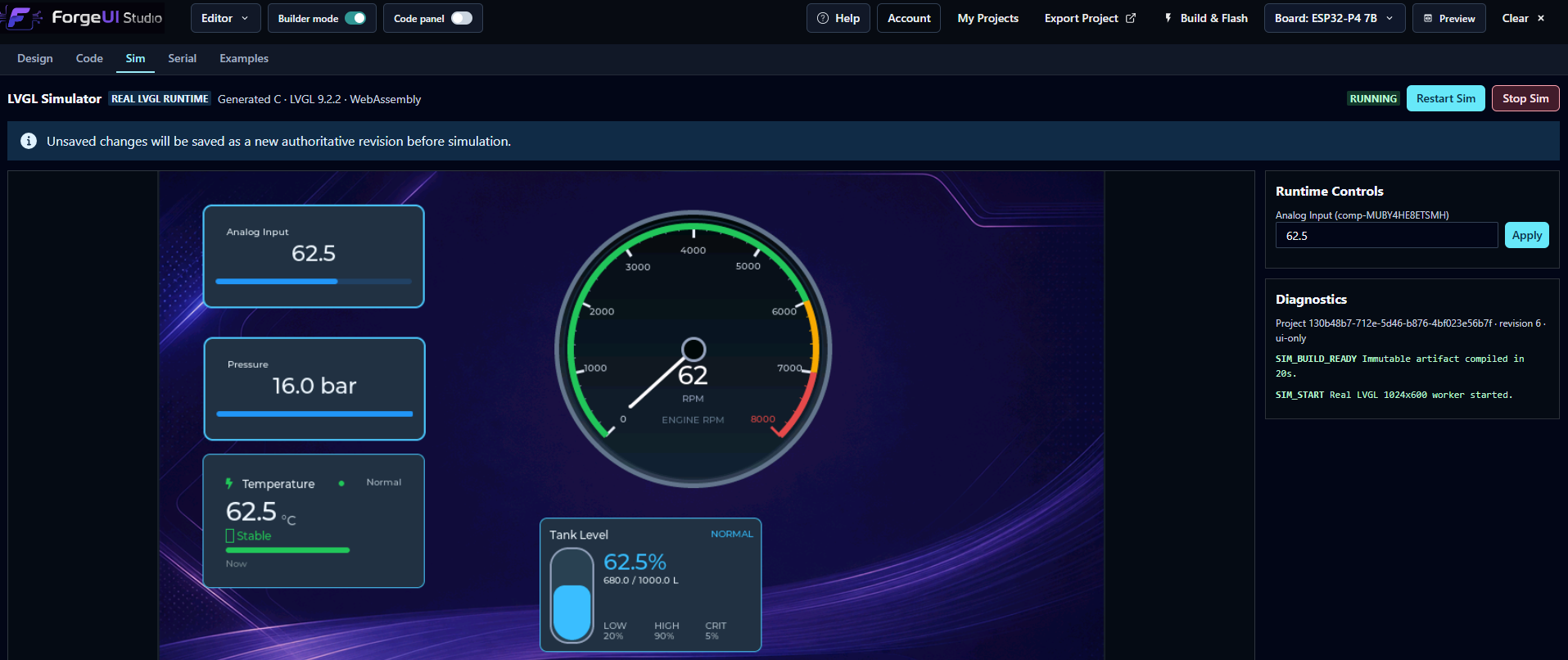
From Inspector to live values
- 01
Add components to the canvas.
- 02
Select Analog Input Measurement.value as the semantic source.
- 03
Add compatible numeric targets.
- 04
Save the direct bindings.
- 05
Open the real LVGL Sim.
- 06
Use Runtime Controls to inject a test value.
- 07
Watch every bound target update with its own behaviour.
- 08
Export or flash the same generated application architecture.
Current scope: direct numeric bindings
The active source is Analog Input Measurement.value. Compatible float targets include:
- • Pressure Measurement
- • Temperature Measurement
- • Flow Measurement
- • Voltage Measurement
- • Current Measurement
- • Sensor Tile
- • RPM Gauge
- • Speedometer
- • Tank Level Card
- • Battery Card
Clear hardware boundary
Runtime Controls are transient, Sim-only developer tools for approved FLOAT Runtime SDK values. They are separate from the designed HMI and do not persist project defaults.
Visual Logic bindings do not configure GPIO, ADC, CAN or Modbus hardware. Boolean logic, button actions, equipment commands, formulas, scaling transforms and arbitrary node graphs are not part of the current production slice.
Read the LVGL Simulator workflow →Test application and sensor values before connecting hardware.
ForgeUI Hosted Studio is free for home & personal use. Commercial and business licensing is separate.